
Open-Source LLM Wiki: Verified GitHub Implementations (2026)
This is the curated directory of open-source LLM Wiki implementations on GitHub that we have verified against the repo itself — not the pitch on Twitter, not a round-up article from a competitor, the actual README and commit history. Karpathy's gist went viral in early April 2026 and the GitHub ecosystem has been on fire ever since: there are dozens of forks, hastily-named "wiki" repos, and a healthy dose of projects that claim an LLM Wiki skill their README does not back up. This page separates the real from the aspirational, honestly. The non-developer companion is our no-code tools page; start there if you have not picked a side yet.
What "verified" means on this page
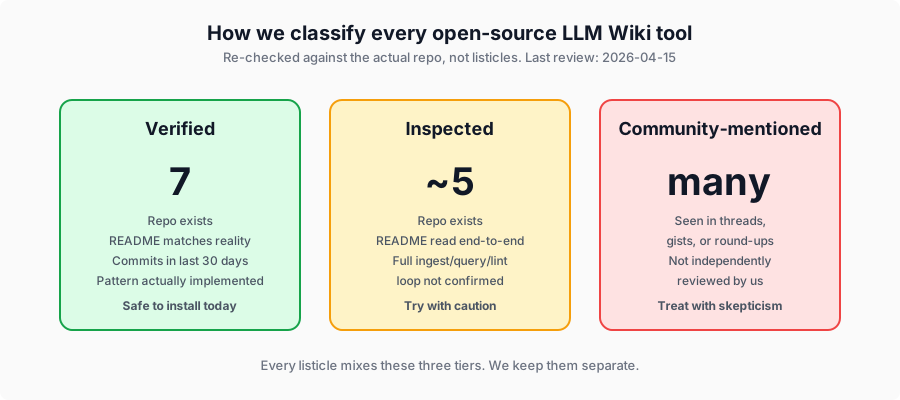
Open-source directories tend to mix three very different things: repositories the maintainer has actually installed, repositories someone read the README of, and repositories someone saw mentioned in a thread. This page keeps those three buckets separate.
- Verified — we reviewed the repo directly, confirmed it exists, matches its own description, and has commits or releases within 30 days of this page's last update. Seven tools currently pass.
- Inspected — repo exists and the README is coherent, but we have not independently confirmed it implements the full ingest / query / lint loop from the gist.
- Community-mentioned — appears in community discussion or round-up lists but is not verified against the repo. Listed for completeness; treat with skepticism.
Every verified entry below was re-checked on 2026-04-15. If you maintain a repo you think belongs on this page, email hello@aillm.wiki and we will review it.
Verified implementations at a glance
| Tool | Stars | Difficulty | Stack | Our verdict |
|---|---|---|---|---|
| karpathy/llm-wiki (gist) | spec | ★★★ Medium | Concept gist | The original source of the LLM Wiki pattern — not runnable code, but every implementation below traces back to this document. Read it once before installing anything else. We link to our own [Claude Code walkthrough](/blog/karpathy-llm-wiki-claude-code-setup) for a ready-to-run translation. |
| nashsu/llm_wiki | 1.3k | ★★ Easy | Tauri v2 (Rust + React) | The most downloaded implementation by a wide margin. Ships as a native desktop binary via Tauri (not Electron), so installation is one file. Drag-and-drop folder ingest, graph view via sigma.js, optional LanceDB vector index, Ollama support for fully local runs. Active releases through v0.3.1 (April 12, 2026). |
| llmwiki.app | hosted | ★ Beginner | Hosted web app (open-source core) | Self-describes as 'an open-source implementation of Karpathy's LLM Wiki' on the landing page. The only hosted option that names the gist directly. Good for testing the idea without a local install; see the no-code page for the UX side. |
| kytmanov/obsidian-llm-wiki-local | growing | ★★★ Medium | Python CLI + Ollama | Despite the name, this is a **CLI tool**, not an Obsidian plugin. It reads markdown files, extracts concepts via Ollama, and writes interlinked wiki pages that happen to open cleanly in an Obsidian vault. Fully local. v0.2.0 released April 12, 2026. |
| ekadetov/llm-wiki | 38 | ★★★ Medium | Claude Code plugin + Obsidian | The most Karpathy-faithful workflow if you already run Claude Code. Exposes ingest / query / lint as Claude Code commands and writes into an Obsidian vault directly. Smallest implementation of the seven — only the pipeline, no UI wrapper. |
| skyllwt/omegawiki | 207 | ★★★★ Hard | Claude Code + structured schema | A research-focused wiki platform explicitly credited to Karpathy in its README. Distinguishes itself with 9 entity types and 9 relationship types for academic work — papers, concepts, claims, experiments, ideas. The best verified option for researchers who need stronger schema discipline than a generic wiki provides. |
| swarmclawai/swarmvault | 204 | ★★★★ Hard | Multi-agent + MCP + Git | The only verified implementation designed for teams and multiple coding agents. Supports Claude Code, Copilot, Cursor, and nine other agents through an MCP server layer, plus Git-backed version control and an approval queue for collaborative review. Heavier setup but the one honest answer to 'can my team share one wiki?' |
Seven tools, three use cases. Personal Markdown vault → nashsu/llm_wiki or kytmanov. Built on top of Claude Code → ekadetov/llm-wiki. Research workflows with formal schemas → skyllwt/omegawiki. Team or multi-agent coordination → swarmclawai/swarmvault. Anything hosted → llmwiki.app. If none of these fit, the Claude Code walkthrough lets you build your own from scratch in about thirty minutes.
Install reality check — what actually breaks
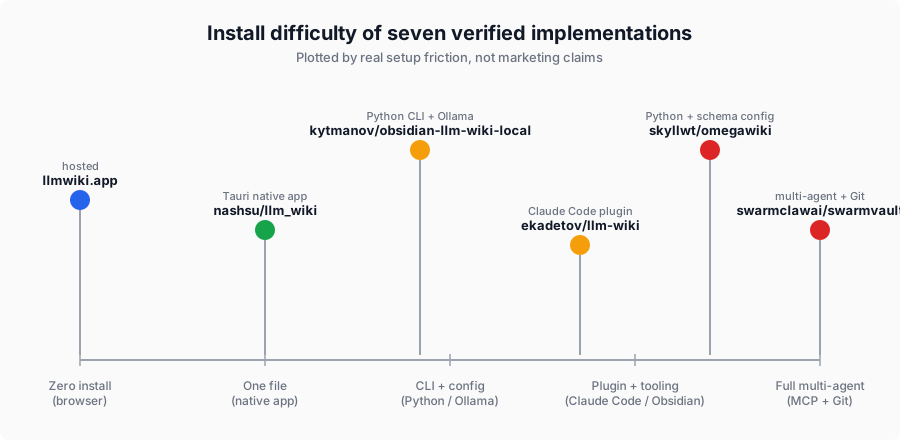
Every tool on the verified list is real, but "real" does not mean "frictionless." Here is what you should actually expect when you sit down to install each one. This is the section non-technical teammates should read before they forward a link to their engineer and say "install this for me."
nashsu/llm_wiki (easiest)
Download the installer from the releases page, open it, drag a folder in. That is genuinely the whole setup if you are running with a cloud LLM. The friction starts if you want local-only operation: you need Ollama installed separately (one-line install on Mac via Homebrew, three-step on Windows), and you need to pull a model (ollama pull llama3) before the first run. The app does not do this for you, and the error message when it cannot reach Ollama is unfriendly. Budget twenty minutes if you are going local, two minutes if you are using an API key.
llmwiki.app (no install)
You sign in. That is it. The friction here is not installation, it is understanding the three-button ingest / query / lint flow — not because the UI is bad, but because the vocabulary is unfamiliar. The first wiki you create will look wrong, and you will blame yourself before you realize your sources need to be grouped by topic rather than dumped in one pile.
kytmanov/obsidian-llm-wiki-local (Python CLI)
Clone, pip install, install Ollama, pull a model, edit a config file, point the CLI at a folder of markdown. The README is clear and the steps are well-ordered, but none of this is discoverable if you have never used a Python CLI. The biggest gotcha is that the name sounds like an Obsidian plugin and it is not — you run the CLI separately, then open the output folder in Obsidian.
ekadetov/llm-wiki (Claude Code required)
You need Claude Code installed and a working Obsidian vault before the plugin does anything. If both prerequisites are satisfied, the install itself is a one-liner. If not, you are looking at a Claude Code subscription and an hour of Obsidian setup before the tool is even unpacked. Best for people already living inside the Anthropic tool stack.
skyllwt/omegawiki (heaviest)
The richest feature set on this list is also the heaviest install. You need Python, Claude Code, and a willingness to fill out a schema configuration file before the first wiki page appears. This is not a negative — the schema discipline is the whole point for academic users — but it means the time-to-first-useful-page is closer to an hour than to five minutes. Researchers will find this acceptable. Everyone else should start with nashsu.
swarmclawai/swarmvault (team-focused)
Installing for a single-user run is easy. Configuring the multi-agent MCP layer, wiring up Git hooks, and setting up the approval queue for a real team takes an afternoon. The docs are good and the payoff is real — this is the only verified tool that handles multi-user coordination without falling over — but do not underestimate the setup if you are rolling it out to a team of five.
Five concerns the community keeps raising
These are the recurring questions we see about LLM Wiki implementations across the open-source ecosystem. Each one is worth knowing before you pick a tool, and each one maps to at least one verified implementation that handles it reasonably well.

Staleness and schema drift
The single biggest worry. LLM Wikis look great at 50 pages and start showing cracks around 500: pages contradict each other, the same concept lives under slightly different names, and the index article drifts from the actual content. The core fix is a diff-before-write step that compares new sources to existing pages before compiling, plus a lint pass that flags contradictions.
- Handled well: nashsu/llm_wiki has a built-in lint operation surfaced in the UI. skyllwt/omegawiki's rigid schema catches drift mechanically.
- Handled poorly: anything that treats ingest as "summarize and append" without a diff step.
Our LLM Wiki Starter Kit exists mostly because every implementation here leaves the last 20% of drift management to you. The kit ships a tuned lint script that catches contradictions the individual tools miss.
Privacy and local-only pipelines
Every implementation on the verified list can be run against a local Ollama model except llmwiki.app (hosted) and swarmvault (MCP-first, so it leaves your machine when agents coordinate). The strongest privacy story is nashsu + Ollama — the whole stack runs on your laptop with no outbound network calls once models are pulled. kytmanov is second, with the same Ollama path but a Python CLI instead of a native app.
If you are working with client NDAs, pre-publication research, or enterprise-sensitive documents, default to nashsu or kytmanov. Do not rely on "we promise not to log your data" from a hosted service.
Scaling past 1,000 pages
Verified results are thinner here than we would like. nashsu/llm_wiki reports it handles low thousands of pages comfortably on a modern laptop with its optional LanceDB vector index. skyllwt/omegawiki is the only tool whose README explicitly targets multi-thousand-entity research graphs. ekadetov/llm-wiki inherits whatever Claude Code's context window allows, which is a soft ceiling around a few hundred pages of dense content.
The honest answer: for any wiki you plan to grow past 500 pages, pair the tool with a stricter schema so the compile step knows what to merge and what to keep separate. Breadth without schema is where wikis die.
Multi-agent and team concurrency
Most implementations were built with a single user and a single agent in mind, which is why "can my team share one wiki?" keeps surfacing as a frustration in community threads. Only swarmclawai/swarmvault was designed from day one for multi-agent coordination: Git-backed state, an approval queue for conflicting edits, and an MCP server that mediates access across Claude Code, Copilot, Cursor, and nine other agents.
If your wiki is single-user, any verified tool will do. If you have more than one person or more than one agent writing into the same wiki, swarmvault is the only verified option that will not corrupt itself within a week.
Per-project versus global wikis
This question surfaces less often than the others but matters for planning. The community convention is now clearly toward one wiki per project or topic, not one global wiki for everything. Reasons: schema drift is worse when topics are heterogeneous, and LLMs query smaller wikis faster with better recall. All seven verified tools support multiple separate wikis — you just create another folder or workspace. The Starter Kit ships with a multi-wiki directory layout for exactly this reason.
Community-mentioned, not yet verified
These appear in community discussion or round-up articles about the LLM Wiki pattern but have not been independently verified against the repo. They are listed here for completeness and should be treated with appropriate skepticism until we can confirm what they actually ship. We have pruned several tools that were previously on this page after confirming they either do not exist, do not implement the LLM Wiki pattern, or ship something unrelated to what round-up articles claimed.
| Repo or project | What it claims | Status |
|---|---|---|
| rohitg00/llm-wiki-v2 (gist) | Karpathy extension with a "persistent memory engine" layer | Gist accessible but we have not walked through the code |
| ss1024ss/llm-wiki | A Karpathy-pattern fork; appeared in multiple community threads | Repo present, not verified |
| pratiyush/llm-wiki | Another community fork of the pattern | Repo present, not verified |
| houseofmvps/codesight | Wiki-adjacent coding-agent memory tool | Repo present, connection to LLM Wiki pattern unconfirmed |
| milla-jovovich/mempalace | Memory palace take on the pattern | Repo present, not verified |
Explicitly pruned (do not use)
A handful of entries that appeared in earlier round-up articles (including an earlier version of this page) have been removed because we could not verify they implement the LLM Wiki pattern, or in some cases could not verify they exist at all. Specifically: Hermes Agent "LLM Wiki skill" (Nous Research's Hermes Agent is real, but its published skills list does not include an LLM Wiki skill as of April 2026), iii-engine / agentmemory (unrelated agent memory project, not an LLM Wiki implementation), second-brain (Spisak) and Vibecoded Android/Windows port (unverifiable). If you see these listed elsewhere with an "installed and tested" verdict, treat the listing itself as a signal that the reviewer did not install any of the tools they wrote about.
How to pick
| If you want… | Start with |
|---|---|
| The fastest hands-on demo | llmwiki.app (hosted) or nashsu/llm_wiki (desktop) |
| A Karpathy-faithful Claude Code workflow | ekadetov/llm-wiki + Obsidian |
| Fully local, no cloud LLM | nashsu + Ollama or kytmanov + Ollama |
| Research-grade schema discipline | skyllwt/omegawiki |
| Team or multi-agent coordination | swarmclawai/swarmvault |
| To build your own from scratch | Our Claude Code walkthrough |
If none of these fit, building your own from scratch against the gist takes about thirty minutes — it is a dozen lines of Python plus a tight CLAUDE.md. We walk through the whole build in the blog post linked above.
What is not on this page
We deliberately exclude three categories:
- Vector databases dressed up as LLM Wiki. RAG is a different pattern; see LLM Wiki vs RAG for why. A tool that re-derives answers at query time is not implementing the wiki pattern regardless of marketing.
- AI note-taking SaaS with no markdown export and no ingest / query / lint operations. Mem.ai, Reflect.app, and similar are good products but not LLM Wiki tools.
- Forks that add nothing. There are now thirty-plus Karpathy gist forks; the verified list above is the subset that actually build on top of the spec rather than rephrase it.
If you would rather skip the evaluation entirely
The LLM Wiki Starter Kit is a pre-tuned version of everything on this directory: five CLAUDE.md files, three production schemas, a lint script, an ingest pipeline with diffing, and a video walkthrough. It works on top of nashsu, kytmanov, or a bare Obsidian vault — you pick the engine, the kit supplies the discipline. $19 launch price for waitlist subscribers.
Frequently asked questions
Will any of these scale to 10,000 pages?
The honest answer is "not yet, without extra work." Verified performance data above 1,000 pages is thin. nashsu/llm_wiki with its LanceDB index is the strongest candidate, and skyllwt/omegawiki's schema-heavy approach may hold up better at scale than a generic markdown dump. For wikis over a few thousand pages, expect to pair the tool with a stricter schema and a more aggressive lint pass than any of the tools ship out of the box.
Should I use Ollama or a cloud LLM?
Use Ollama if privacy is the constraint; use a cloud LLM if quality is the constraint. Cloud models (Claude, GPT-4, Gemini) still produce better wiki pages than anything you can run on a laptop, but the gap is closing with each new Ollama release. For confidential work the privacy tradeoff wins easily. For public research the quality tradeoff wins.
Can I run this on my team's shared repo?
Most of the verified tools were not designed for shared use. swarmclawai/swarmvault is the one exception and is the right starting point if your wiki needs to live beside code in a Git repo. Everyone else should expect single-user workflows until the community catches up.
What licenses are these repos under?
All seven verified tools are MIT- or Apache-licensed based on their repo metadata. Double-check the LICENSE file in any repo you adopt — open-source does not always mean "free for commercial use."
How often do you re-verify?
Monthly. Next scheduled re-verification: first week of May 2026. If a verified tool goes abandoned (no commits in 60 days), it drops to the Inspected tier. If a community-mentioned tool shows real activity and clean documentation, we promote it up.
Why did the old version of this page list tools that have now been removed?
Because open-source tool directories rot faster than anyone wants to admit. The previous version of this page inherited a list partly based on round-up articles rather than direct verification. We re-checked every entry against the actual repo in April 2026 and pruned the ones that did not hold up. That is the standard we hold ourselves to going forward.
Related reading
- Karpathy's LLM Wiki with Claude Code: complete tutorial — build your own in 30 minutes
- What is LLM Wiki? A plain-English primer
- LLM Wiki vs RAG: when to use which
- LLM Wiki in Obsidian: step-by-step setup
- LLM Wiki for research: Zotero, citations, and schema
- No-code LLM Wiki tools — for non-developer teammates
- Free LLM Wiki schemas — three production schemas to drop into any tool above
- LLM Wiki Starter Kit — full product overview