
LLM Wiki No-Code Tools — Honest 2026 Comparison
If you read Karpathy's LLM Wiki gist and tried to run it, you probably hit the same wall most non-developers do: every tutorial opens with git clone and a Python environment. This page exists for the rest of us — a short, honest list of no-code LLM Wiki tools you can actually use without a terminal. We went wide across the ecosystem and the number of truly no-code options is smaller than most listicles pretend. Only two tools are currently install-free enough to recommend to a writer, consultant, or researcher with a straight face, and we explain below why the rest belong in a separate, honest "requires some setup" bucket.
New to the whole idea? The LLM Wiki vs RAG explainer is a faster primer than this page.
Truly no-code LLM Wiki tools (the shortlist)
Two tools pass our "install nothing, type nothing" bar. Everything else on the internet that calls itself "no-code" either needs a command line, a Claude Code session, or a pile of Obsidian plugins glued together by hand.
| Tool | Best for | Difficulty | Stack | Our verdict |
|---|---|---|---|---|
| llmwiki.app | Fastest test drive | ★ Beginner | Hosted web app | The only fully hosted implementation we have found that explicitly follows Karpathy's gist. Sign in, drop in sources, watch the wiki compile in your browser. Active development as of April 2026; expect edges but the UX is the cleanest of the bunch. |
| nashsu/llm_wiki | Offline, drag-and-drop | ★★ Easy | Tauri desktop app (Rust + React) | A real downloadable desktop app (1.3k stars, releases through April 2026). Not Electron — it ships as a small Tauri binary you install like any other Mac/Windows app, then drag a folder in. Works with cloud LLMs or local Ollama if you want zero internet. |
| Notion + manual workflow | If you refuse new tools | ★★ Easy | Notion AI (native) | Notion is not an LLM Wiki tool by design, but Notion AI + a database template is the only way some readers will tolerate adopting the pattern at all. Manual compile loop, worse schema fidelity, but zero new apps to learn. |
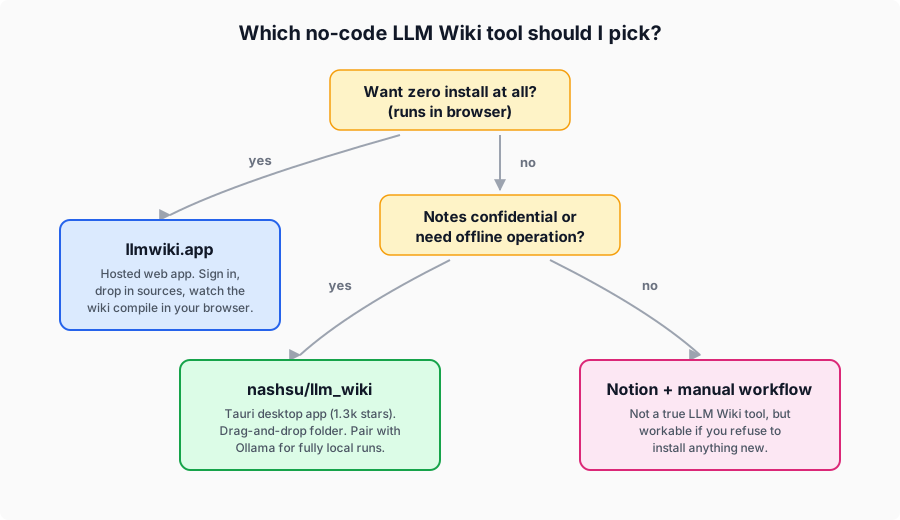
If you only have ten minutes to try this, start with llmwiki.app. If you care about privacy or want the wiki living on your own hard drive, install nashsu/llm_wiki and give it a folder. Notion is the "I will not install anything new" path, and we hold our nose a little on the schema fidelity but it works.
Before you pick a tool — five questions the community keeps asking
Most "best no-code AI tool" listicles skip this section because the honest answers are uncomfortable. These five questions surface in almost every conversation about LLM Wikis, and the answer should shape which tool you adopt.
Will my wiki quietly rot as I add more notes?
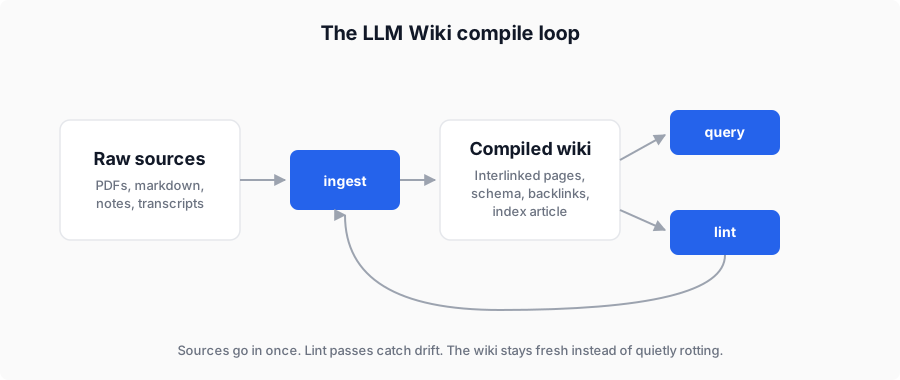
This is the single biggest worry we see. LLM Wikis look great at 20 pages and start showing cracks around 200 — pages contradict each other, the same concept lives under three slightly different names, and the index article lies about what is actually inside. The fix is a compile step that diffs new sources against existing pages before writing, and a lint pass that flags contradictions.
- llmwiki.app bakes the diff step into the ingest flow; you can see it running in the UI.
- nashsu/llm_wiki exposes a lint command you can run from the desktop app's menu.
- Notion has nothing comparable; staleness is entirely on you to manage.
If you plan to keep your wiki for more than a few weeks, make sure your tool has an answer to this. The Starter Kit we ship adds a hand-tuned lint script on top of any of the above, which is why we built it.
Can the whole thing stay on my own computer?
Writers with client NDAs, researchers with pre-publication data, and anyone in healthcare, law, or enterprise consulting will ask this first. The honest answer:
- nashsu/llm_wiki + Ollama is the cleanest fully-local path. Nothing leaves your machine if you point it at a local model.
- llmwiki.app runs in the cloud; your sources go to their servers. Fine for public research, not fine for confidential work.
- Notion stores everything on Notion's servers regardless of what model you pick.
Non-technical readers often underestimate how much "cloud LLM" means "your text is on someone else's computer." If that matters, default to nashsu.
Do I actually need to know Markdown?
You do not need to write markdown, but you do need to not be scared of it. LLM Wiki pages are markdown files under the hood. The tools above render them nicely, but if you export, edit, or share a page, you will see the raw # and [[link]] syntax. Anyone who has ever written a simple blog post can handle this inside an afternoon. Our no-code LLM Wiki walkthrough covers the ten markdown things that actually matter for a wiki.
Can my team share one wiki without overwriting each other?
The uncomfortable answer: no no-code tool handles this well yet. The three tools above are single-user tools. If you need shared team editing today, you are looking at either a Notion database with its native comment/permission system, or stepping up to swarmvault on the open-source side, which bolts Git onto the pattern for team coordination. We cover the team tradeoffs in the open-source tools page.
What happens when I hit 500 pages?
Short honest take:
- llmwiki.app — unverified at scale; the largest wiki we have seen in their dashboard is under 100 sources.
- nashsu/llm_wiki — runs on your laptop, so it scales until your laptop's RAM gives up. The optional LanceDB index helps.
- Notion — scales fine as a database but you lose the LLM Wiki pattern entirely past a few hundred pages because the manual compile loop collapses.
For anything past ~300 pages, the honest advice is to either adopt a stricter schema (our free schemas are designed for this) or move to a code-based implementation. Depth beats breadth.

Deep-dives on the two real no-code tools
llmwiki.app — the cleanest hosted demo
llmwiki.app is a hosted web app whose homepage openly describes itself as "an open-source implementation of Karpathy's LLM Wiki." You sign in, drop in markdown or PDFs as "sources," and watch the tool compile a structured wiki in your browser. It exposes the three operations that matter in the gist — ingest, query, lint — as actual buttons, which is the first time we have seen someone translate Karpathy's terminology directly into UI.
What works for non-developers. Zero install. A visible "dashboard" showing your sources and their last-updated timestamps, which answers the "is it stale?" fear without requiring you to read code. The lint button highlights contradictions in plain English. If you have never touched a terminal in your life, this is the only tool on the list you can get useful output from in five minutes flat.
What to watch out for. It is roughly one month old as of this writing. Expect missing features (no advanced schema customization yet, limited import formats, no multi-user sharing), the occasional UI hiccup, and some gaps in error messages when things break. We would not pay for a lifetime license today; we would happily pay for a monthly plan when one exists.
Use it if you want to verify the LLM Wiki idea actually works for your content before investing any setup time. Upload a folder of your research notes or blog drafts and give it ten minutes. If it produces something usable, you will know within that window.
nashsu/llm_wiki — real desktop app, surprisingly polished
nashsu/llm_wiki was the first implementation to cross 1,000 GitHub stars, and the reason is mostly UX. It ships as a real downloadable desktop binary built on Tauri v2 (a lighter, Rust-based alternative to Electron), so the install is one file instead of a Node.js environment. You open the app, drag a folder of PDFs or markdown in, and watch it build an interlinked wiki with a graph view courtesy of sigma.js. Releases are still landing through April 2026 (v0.3.1 at time of writing), so this is not a side project someone abandoned.
What works for non-developers. Drag-and-drop import. A real native window, not a browser tab. Graph navigation that shows you visually how your notes connect, which is the single most requested feature from readers who came from "second brain" apps. Optional local model support via Ollama means you can run the whole thing offline with zero signups.
What to watch out for. Installing Ollama for the local-model path is the one thing here that is legitimately not zero-code — Ollama itself is a command-line install on some platforms. If you want to stay fully graphical, point nashsu at a cloud LLM API key instead (you will need to paste an API key once, which is the most "technical" step required).
Use it if your notes are confidential, you want an offline wiki, or you simply prefer real native apps over browser tabs. This is our default recommendation for researchers, consultants, and writers with client work.
Notion + manual Notion AI workflow
Notion is not, strictly speaking, an LLM Wiki tool. Notion AI is a chat assistant, not a compile pipeline. But a small army of our readers tell us they will not install anything new, ever, and they already pay for Notion. For that audience, the honest advice is: you can approximate the pattern inside a Notion database by treating one page per concept, manually invoking Notion AI with a fixed prompt whenever you add a source, and using Notion's native backlinks as your graph. You lose the automatic compile loop, the lint step, and the schema discipline that make LLM Wiki powerful. What you keep is a familiar tool you already know and zero new learning curve.
If you want the full Karpathy experience, you will eventually outgrow Notion. If you just want to try the pattern without adopting a new app, it is a defensible starting point — and we are building a Notion-compatible template to reduce the amount of manual fiddling required.
Community-mentioned tools (not verified for non-developers)
These appear in community discussions around the LLM Wiki pattern, but we do not recommend them to non-technical readers because they all require either a command line, a Claude Code session, or a serious Obsidian setup. They are listed here only so you can make a fully-informed decision.
| Tool | Why it is not in the main list | Better home |
|---|---|---|
| kytmanov/obsidian-llm-wiki-local | Despite the name, this is a CLI tool, not an Obsidian plugin. It writes markdown that happens to be Obsidian-compatible. | Open-source page |
| ekadetov/llm-wiki | A Claude Code plugin. Requires Claude Code installed and a configured Obsidian vault. | Open-source page |
| skyllwt/omegawiki | Research-focused wiki platform (207 stars). Explicitly Karpathy-inspired, but needs Claude Code and a Python environment to run. | Open-source page |
| swarmclawai/swarmvault | Team/multi-agent oriented (204 stars). The best answer we have seen for "can my team share one wiki" but requires Git and agent integration. | Open-source page |
| Mem.ai / Reflect.app | Polished AI note-taking apps. They overlap the "second brain" idea but neither implements the LLM Wiki compile-and-lint loop, so we do not consider them LLM Wiki tools. | Their own marketing sites |
We have flagged a handful of other tools that appear in round-up articles (several with names that imply LLM Wiki compatibility) as unverified. If a tool's own README does not reference the Karpathy pattern and expose ingest / query / lint as distinct operations, we do not list it as an LLM Wiki tool regardless of what a listicle says.
How we evaluated these tools
Every tool on the "truly no-code" list passes three checks:
- Accessible to non-developers. Install path is one file, or no install at all. No terminal, no plugin configuration, no
pip install. - Actually implements the pattern. The tool exposes ingest, query, and lint as distinct operations, not just "summarize this folder into an AI chat."
- Real and active as of April 2026. The URL resolves, the repo has commits in the last 30 days, and the project is not abandoned.
If you think we have wrongly excluded a tool, email hello@aillm.wiki with a link and we will re-evaluate within the week. Pages on this site are re-checked monthly; the next scheduled review is the first week of May 2026.
If you do not want to evaluate three tools yourself
We maintain an LLM Wiki Starter Kit for readers who would rather pay a coffee-shop amount of money and skip the evaluation entirely. It includes the five CLAUDE.md files we tuned ourselves, our three production-grade schemas, and a drop-in pipeline that works with either nashsu or a bare Obsidian vault. This is genuinely the only plug the page makes — the tools above are free, they work, and we encourage you to pick whichever one fits your workflow best.
Frequently asked questions
Which tool is closest to what Karpathy actually uses?
Karpathy's own setup is Claude Code with Obsidian, which is decidedly not no-code. Of the no-code options above, nashsu/llm_wiki most closely mirrors the same three operations (ingest, query, lint). llmwiki.app is conceptually closest because it names those three operations in the UI; nashsu is practically closest because it handles large folders and offline models the way a developer would.
Can I use these without paying for an LLM API?
Yes. nashsu/llm_wiki supports Ollama out of the box, so you can run a wiki entirely on a local Llama or Mistral model with zero API costs. The tradeoff is speed — local models are slower and produce lower-quality summaries than Claude or GPT-4. For a wiki of more than 100 pages, paying a few dollars a month for cloud LLM access is usually worth it. llmwiki.app bundles the LLM into the service (their cost) but may meter usage once they exit beta.
Will any of these import my existing notes?
All three accept markdown and PDFs as input. llmwiki.app uploads through the browser; nashsu lets you pick a local folder; Notion has a markdown import workflow in its settings. If your notes currently live in Bear, Logseq, or Roam, you will need to export to markdown first — all three of those apps expose an export option.
Do I actually need to know Markdown?
You do not need to write it, but you will see it when you export or peek at files directly. Markdown is roughly as hard as email formatting. Spend ten minutes on our no-code walkthrough if you want a gentle introduction before diving in.
How do I avoid getting locked into one tool?
Every tool on the shortlist stores your wiki as plain markdown files on disk (or exportable to markdown in llmwiki.app's case). If the tool disappears tomorrow, you keep your content. This is the single biggest argument for picking one of these over a proprietary notes app whose export leaves you with a JSON blob.
What if I just want Notion to do this for me?
You can manually run the pattern inside a Notion database as described above, but you lose the automatic compile loop. If Notion is a hard constraint, wait for our Notion template which bakes a structured version of the pattern into a database you can duplicate.
How often do you update this page?
Monthly, with the next scheduled review in early May 2026. The ecosystem moves fast — the four community-mentioned tools above all appeared in the last six weeks — so bookmark the page if you want to see which tools graduate out of "community-mentioned" as we verify more of them.
What about ChatGPT with a folder of files?
ChatGPT's "custom GPT" feature with uploaded files is not an LLM Wiki; it is closer to in-context retrieval, which is exactly the thing Karpathy's pattern was designed to replace. The wiki in LLM Wiki is a compiled, persistent artifact you can read and edit. A ChatGPT conversation is ephemeral. See LLM Wiki vs RAG for the full distinction.
Related reading
- What is LLM Wiki? A plain-English primer
- LLM Wiki vs RAG — when to use which
- How to build an LLM Wiki without writing code — step-by-step walkthrough using the tools above
- LLM Wiki in Obsidian: step-by-step setup
- Open-source LLM Wiki implementations — the developer-side companion to this page
- Free LLM Wiki schemas — three schemas you can paste into any tool above
- LLM Wiki Starter Kit — if you would rather skip the evaluation